During an active outage or routine maintenance window, the compounding operational cost of untraceable cables, misidentified servers, and undocumented hardware becomes immediately apparent. Technicians waste critical minutes tracing power lines manually. Engineers hesitate to disconnect ports due to ambiguous tags. These delays directly extend downtime and inflate operational expenses. Scaling IT infrastructure without a standardized, durable identification framework leads to prolonged Mean Time to Repair (MTTR), accidental disconnects, and failed compliance audits. Physical infrastructure management requires the same rigor as network security. Implementing enterprise-grade data center labels and strict naming conventions transforms chaotic environments into manageable, predictable, and secure assets. A clear visual identification system bridges the gap between digital infrastructure management tools and the physical hardware on the floor. Proper tagging methodologies ensure that every technician, contractor, and auditor can navigate the facility with absolute certainty.
Standardization is Non-Negotiable: Adhering to frameworks like ANSI/TIA-606-C ensures scalability and cross-team alignment during troubleshooting and deployment.
Environment Dictates Material: Standard office labels fail under data center thermal, exhaust, and airflow conditions; industrial labels are required for longevity and adherence.
Comprehensive Coverage: Effective labeling requires a unified, top-down approach across five tiers: facility/aisles, racks/cabinets, IT equipment, network ports, and individual cables.
Digital Integration: Utilizing barcode, QR, or RFID labels bridges the gap between physical assets and Data Center Infrastructure Management (DCIM) software.
The Operational Impact of Standardized Data Center Labels
A successful labeling initiative directly improves facility uptime, security, and deployment speed. High-density environments demand precision. When thousands of identical cables and servers populate a single room, visual clarity defines operational success. You cannot manage what you cannot accurately identify.
Reducing Mean Time to Repair (MTTR)
When a core switch drops offline at 2 AM, your remote hands team needs to find the exact physical port immediately. Clear visual identification accelerates fault isolation during critical incidents. Standardized tags eliminate the need for manual cable tracing. Technicians walk directly to the specified aisle, rack, and U-space. They verify the asset tag against the work order and execute the replacement. We see facilities cut their hardware replacement times in half simply by removing the guesswork. Predictable physical navigation directly reduces MTTR. If a technician has to tug on a cable to see where it goes, your labeling system has failed.
Accelerating Initial Installation and Commissioning
A pre-defined labeling strategy speeds up the initial rack and stack phase of new server deployments. Deployment teams arrive on-site with a clear map of where every chassis belongs. Tags verify that physical installations match architectural design documents perfectly before systems go live. Installers do not guess port assignments. They follow the pre-printed nomenclature, ensuring the physical build mirrors the logical design. This alignment prevents configuration errors during the commissioning phase. You can stage hundreds of servers in a staging area, tag them, and roll them onto the floor for rapid, error-free deployment.
Compliance, Auditing, and Security
Asset tracking plays a mandatory role in meeting SOC 2, ISO 27001, and internal compliance mandates. Auditors require proof that organizations track physical hardware accurately. Physical labels prevent unauthorized hardware swaps. They deter the installation of rogue devices. When every server, switch, and PDU carries a registered asset tag, security teams can audit the floor quickly. Missing or altered tags immediately flag potential security breaches or undocumented changes. We use tamper-evident materials for high-security environments to show if someone tried to peel and move a tag to mask unauthorized hardware.
Eliminating Human Error in MACs (Moves, Adds, and Changes)
Ambiguous or missing tags cause accidental disconnects. Technicians performing routine upgrades might pull the wrong power feed if A/B lines lack clear identification. Standardized tags streamline contractor and remote-hands workflows. When off-site engineers direct local technicians to reboot a server, precise nomenclature ensures they target the correct machine. Removing ambiguity removes the primary cause of human error during daily MAC operations. A well-labeled environment allows junior technicians to execute complex work orders with the accuracy of senior engineers.
Industry Standards and Naming Conventions
Establishing baseline rules for data center nomenclature prevents localized naming habits from fracturing facility management. Consistent standards ensure long-term scalability across multiple geographic locations.
ANSI/TIA-606-C Guidelines for Administration
The TIA-606-C standard defines the core requirements for telecommunications infrastructure administration. It dictates a logical alphanumeric formatting structure for all physical elements. This standard ensures that cables, pathways, spaces, and grounding systems share a unified identification logic. Following TIA-606-C means a technician from one facility can seamlessly understand the infrastructure of another facility. It removes guesswork and enforces a universally understood language for physical assets. You do not have to invent a system from scratch; the framework already exists and has been battle-tested in enterprise environments.
Developing a Scalable Nomenclature
Creating a naming convention requires a hierarchical decision framework. A standard sequence flows from macro to micro: Site > Room > Row > Rack > U-Space > Port. For example, a tag reading "NY1-R2-A04-U12-P01" instantly communicates the exact location: New York Facility 1, Room 2, Row A04, Rack Unit 12, Port 01. This level of granularity allows a remote engineer to direct a local technician with pinpoint accuracy. Identifiers must remain human-readable. They must also remain concise enough to fit on small print areas like patch panels or fiber connectors. Avoid overly complex abbreviations that require a decoder ring to understand. Keep it simple, logical, and strictly enforced across all teams.
Color-Coding Strategies for Power and Data
Color-coding provides instant visual context before a technician even reads the text. Distinct colors separate redundant power feeds. Labeling the 'A' feed red and the 'B' feed blue prevents technicians from accidentally dropping both power sources to a single chassis during a maintenance window. You can extend this to power phases, using distinct colors for L1, L2, and L3 to ensure balanced loads across the PDU. Color strategies also differentiate network topologies. Yellow cables might denote production traffic, while green indicates storage networks, and purple signifies management interfaces (iLO/iDRAC). This visual separation accelerates troubleshooting and protects critical data paths from accidental unpatching.
Step-by-Step Asset Identification Framework
Effective identification requires specific approaches for different physical assets. A top-down methodology ensures no component goes undocumented, from the concrete floor to the smallest fiber strand.
Facility, Aisle, and Floor Grid Labeling
Raised floors and overhead trays require an X/Y coordinate grid system. This grid locates specific tiles, racks, and containment zones. High-visibility navigation signs hang above aisles. Row end-caps feature large placards guiding technicians to the correct zone efficiently. Without floor grid labeling, finding a specific cabinet in a mega-facility becomes a time-consuming search. The grid system acts as the foundational map for all subsequent asset tags. When a tile needs to be pulled for under-floor cable routing, the grid coordinates ensure the correct tile is removed without disrupting adjacent airflow.
Server Rack and Cabinet Identification
Cabinets require labels on both the front and rear doors. Technicians working in the hot aisle must identify the cabinet just as easily as those in the cold aisle. High-visibility placards should sit at the top of the rack for row identification. Additional tags belong on the frame itself, ensuring identification remains intact even if doors are removed for maintenance. Consistent rack identification anchors the entire spatial tracking system. We recommend using reflective materials for rack placards to ensure visibility even under emergency backup lighting.
IT Equipment and Server Labels
Place asset tags on servers, switches, and PDUs carefully. Never obstruct intake vents, exhaust fans, or physical ports. A proper server label includes critical data fields: hostname, primary function, IP address, and physical location. Align equipment labels with the corresponding Rack Unit (U-space) markings on the cabinet rails. This alignment confirms the chassis occupies the exact space dictated by the DCIM software. Consistent placement allows for rapid visual scanning during inventory audits. If every server has its tag on the top-right corner of the bezel, an auditor can scan an entire rack in seconds.
Network Gear and High-Density Port Labeling
Labeling a core router chassis differs entirely from identifying individual high-density ports on a line card. The chassis requires a standard asset tag placed on a non-removable component of the frame. Patch panels and line cards offer severely limited physical space for text. Use continuous strip labels for patch panels, aligning the printed text precisely under or over each port block. For ultra-high-density switches, utilize port grouping nomenclature (e.g., Ports 1-12, 13-24) combined with color-coded port blockers for unused interfaces. Clear port identification prevents mispatching during complex network migrations and ensures that switch configurations match the physical cabling.
Cable Labeling Best Practices
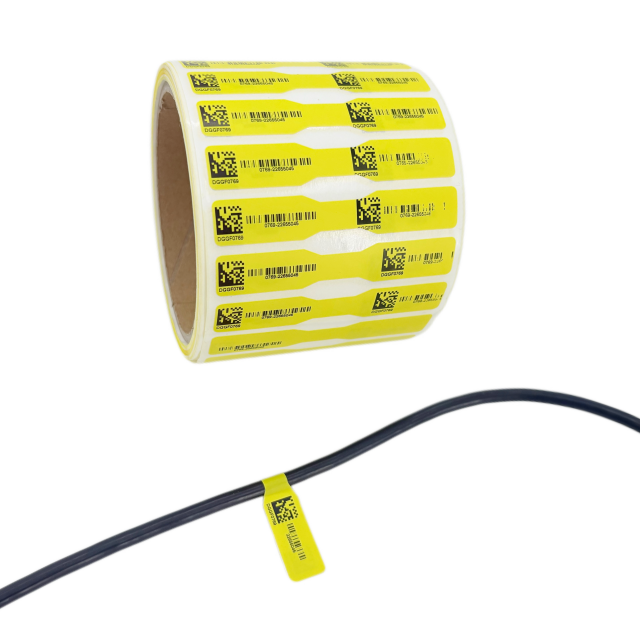
Different cable types require different physical tag formats. The golden rule of cable management dictates labeling both ends of every single cable. Each end must display both the source and destination data. This dual-end strategy ensures safe, confident disconnections.
| Cable Type | Recommended Label Format | Application Method | Primary Advantage |
| Cat6 / Cat6A Copper | Self-Laminating Wrap-Around | Applied 2-3 inches from the connector | Clear tail protects printed text from abrasion |
| Fiber Optic Strands | P-Type Flag Labels | Folded around the jacket without compression | Provides large text area without causing micro-bends |
| Heavy Power Cables (Whips) | Heat-Shrink Tubing | Slid over the unterminated end and shrunk with a heat gun | Permanent adhesion, impossible to peel off |
| Temporary Patch Cables | Repositionable Cloth Tags | Wrapped loosely around the cable jacket | Easy to remove without leaving sticky residue |
Evaluating Label Materials and Technologies
Data center environments destroy standard office supplies. Assessing the physical and technological features of your tagging materials prevents premature failure and data loss.
The Role of Industrial Labels in High-Heat Environments
Standard consumer labels use weak adhesives and paper substrates. They fail rapidly under continuous heat, exhaust, and synthetic cooling environments. Edges curl, ink fades, and tags fall off, clogging server fans. Industrial labels utilize synthetic materials like polyester or vinyl. They withstand high operating temperatures and aggressive airflow. Investing in industrial-grade materials ensures your identification system survives the physical realities of the server room. A tag that falls off a server and gets sucked into a power supply fan creates a fire hazard; material choice is a safety issue.
Adhesives: Permanent vs. Removable vs. Repositionable
Choose adhesives based on the specific asset lifecycle. Permanent adhesives belong on server chassis, PDUs, and rack frames. These assets rarely change identity. Repositionable adhesives suit temporary cable runs or phased migration projects. Removable adhesives work well for contractor equipment or testing rigs. Matching the adhesive strength to the asset's expected lifespan prevents sticky residue buildup and surface damage during hardware refreshes. Using a permanent adhesive on a temporary patch cable means the technician will likely cut the cable rather than spend ten minutes scraping off the glue.
Barcodes, QR Codes, and RFID: Matching Tech to Tracking Needs
Digital tracking technologies bridge the physical and digital divide. Each format offers distinct trade-offs for inventory management.
| Technology | Primary Advantage | Best Use Case | Limitations |
| 1D Barcodes | Simple, legacy hardware support | Basic asset tracking, server chassis | Low data density, requires line-of-sight |
| 2D QR Codes | High data density, URL linking | Linking directly to DCIM asset pages | Requires camera scanners or mobile devices |
| RFID Tags | Automated auditing, rapid scanning | Facility-wide inventory checks | Higher cost, potential metal interference |
Barcode labels streamline the tracking of internet servers, routers, and cables during routine inventory checks. QR codes empower technicians to scan a rack and instantly pull up its maintenance history on a tablet. RFID allows security teams to sweep an entire room in minutes, verifying the presence of hundreds of assets simultaneously without opening a single cabinet door.
Durability Factors
Server rooms require rigorous cleaning protocols. Tags must feature smudge resistance and chemical resistance to withstand industrial cleaning agents. Non-peeling form factors are critical. A peeling tag can detach, get sucked into a server intake fan, and cause localized overheating. Print methods like thermal transfer embed the ink into the substrate, ensuring the text remains legible despite physical abrasion or chemical exposure. Direct thermal printing, which uses heat-sensitive paper, will turn completely black when exposed to the exhaust heat of a dense server rack. Always specify thermal transfer printing with resin ribbons.
Pre-Printed vs. Print-on-Demand Solutions
Procurement methods impact cost, flexibility, and operational workflows. Facility managers must balance bulk efficiency with daily agility.
When to Procure Pre-Printed Asset Tags
Pre-printed tags excel during bulk server deployments or initial facility build-outs. They provide standardized sequential numbering with zero on-site printing errors. High-durability metal RFID tags or anodized aluminum barcodes must be pre-printed by specialized vendors. Use pre-printed solutions for permanent infrastructure like racks, floor grids, and primary power distribution units where the data remains static. Ordering these in bulk ensures absolute consistency in font size, barcode alignment, and material quality across the entire facility.
Evaluating On-Site Thermal Transfer Printers
Investing in portable or desktop thermal transfer printers delivers high ROI for daily MACs and custom cable labeling. Technicians need the ability to generate durable tags on the fly when replacing a failed patch cable or installing a single new server. Look for printers featuring keyboard integration, automatic cutters, and serialization software. A 300 DPI print head is mandatory for generating crisp, readable 2D barcodes on small cable flags. Portable printers empower remote-hands teams to maintain labeling standards without waiting for centralized procurement, ensuring that no undocumented cable ever gets plugged into a production switch.
Integration with DCIM and CMMS Platforms
Printed tags must link directly to Data Center Infrastructure Management (DCIM) or Computerized Maintenance Management Systems (CMMS) databases. Modern serialization software pulls data directly from the DCIM API. This integration ensures the physical tag matches the digital record perfectly. When a technician prints a new cable tag, the system automatically updates the port mapping in the central database, maintaining real-time accuracy across the organization. This closed-loop system prevents the physical floor from drifting out of sync with the digital documentation.
Implementation Risks and Mitigation Strategies
Deploying a facility-wide identification system introduces operational risks. Anticipating these pitfalls ensures a smooth rollout and long-term adherence.
Risk: Adhesion Failure Over Time
Even premium industrial adhesives fail if applied to dirty surfaces. Server chassis often carry manufacturing oils. Rack rails accumulate dust. Mitigation requires proper surface preparation. Strictly match the label substrate to the surface material. Use aggressive adhesives for textured plastics and standard industrial adhesives for smooth metals. Follow these exact steps for application:
Power down the immediate equipment if applying tags near exposed intake vents.
Wipe the target surface with 99% isopropyl alcohol to strip away manufacturing oils and accumulated dust.
Allow the surface to air dry completely for at least sixty seconds.
Apply the tag using firm, even pressure from the center outward to eliminate trapped air bubbles.
Risk: Inconsistent Naming by Third-Party Contractors
External vendors often ignore internal naming conventions, introducing localized chaos during cabling projects. Mitigation involves enforcing strict vendor Service Level Agreements (SLAs). Provide contractors with pre-approved templates and portable printers configured to your standards. Require photographic proof of proper labeling during the final project sign-off phase. Do not release payment until the physical audit matches the SLA requirements. If a contractor runs a hundred cables with handwritten sharpie tags, make them rip it out and do it again.
Risk: Legacy System Migration and Re-Labeling
Attempting to rip and replace all legacy tags in a single weekend leads to massive confusion and potential outages. Mitigation requires a phased auditing workflow. Run legacy and new standards in parallel during a defined transition window. Update tags systematically during scheduled maintenance windows or hardware refresh cycles. Document the cross-reference between old and new naming conventions in the DCIM until the migration concludes entirely. Never remove an old tag until the new tag is applied, verified, and scanned into the database.
Conclusion
Audit a single row or pod to identify current naming inconsistencies, missing tags, and material failures.
Finalize a standardized nomenclature framework based on ANSI/TIA-606-C guidelines and update all architectural documentation.
Procure industrial-grade thermal transfer printers and synthetic label stock tailored for high-heat environments.
Run a pilot program in a non-critical staging area to test adhesive durability and technician workflows before executing a facility-wide rollout.
FAQ
Q: What is the ANSI/TIA-606-C standard for data centers?
A: The ANSI/TIA-606-C standard provides a uniform administration framework for telecommunications infrastructure. It dictates specific alphanumeric formatting for identifying cables, pathways, spaces, and grounding systems. Adhering to this standard ensures consistent identification across facilities, making troubleshooting, maintenance, and future expansions predictable regardless of which technician performs the work.
Q: What type of labels are best for data center cables?
A: Wrap-around self-laminating labels and heat-shrink tubes are the best choices for cables. Self-laminating versions feature a clear tail that wraps over the printed text, protecting it from smudging and abrasion. Heat-shrink tubes provide a permanent, highly durable solution that will not peel off, making them ideal for heavy power cables.
Q: How should server racks be numbered and labeled?
A: Server racks should be numbered using a floor grid coordinate system (X/Y axis). Racks require high-visibility placards on the top front and rear doors. The naming convention should clearly state the row and specific cabinet position. Placing tags on both sides ensures technicians can identify the correct rack from either the hot or cold aisle.
Q: Why use industrial labels instead of standard office labels in a server room?
A: Standard office labels use paper substrates and weak adhesives that fail under continuous server exhaust heat and synthetic airflow. They dry out, peel off, and can get sucked into equipment fans. Industrial versions use synthetic materials like polyester and aggressive adhesives designed specifically to withstand high temperatures and chemical cleaning agents.
Q: Should I use barcodes or RFID tags for IT asset tracking?
A: Barcodes offer a highly cost-efficient, simple solution for basic asset tracking and integrate easily with legacy scanners. RFID tags cost more but provide automated, rapid auditing capabilities. If your facility requires frequent, massive-scale inventory sweeps, RFID justifies the investment. For standard MAC operations, 2D barcodes (QR codes) often provide the best balance of data density and cost.
Q: How do you label fiber optic cables without damaging them?
A: Fiber optic cables are fragile and sensitive to physical pressure. Use flag labels or specialized non-compressive wrap labels. Flag labels attach to the cable and extend outward, providing ample space for text without squeezing the jacket. This prevents micro-bends in the glass core, which can cause severe signal loss or complete data transmission failure.


